Install & Setup
TuneFI installs inline — it plugs between the bike's stock connectors and the injector and TPS. No cutting, no splicing. Budget an hour with the plastics off.
Remove plastics, seat and tank
- Remove the plastics and the seat.
- Remove the tank:
- Unplug the fuel pump connector on the right side.
- Unplug the fuel hose from the tank. There is a U-shaped clip on the fitting — slide it along the fuel hose, then the hose releases.
Keep the fuel hose clear of anything hot and you don't need to drain the tank.
Wire TuneFI in
Injector. Locate the injector, unplug the stock harness from it, and plug TuneFI in between. TuneFI ships with the stock connectors — plug and play.
TPS. Same job: unplug the stock connector at the TPS and plug TuneFI in between.
Ground. The ring terminal is ground, and ground is the most important connection on the bike. Every voltage is referenced against it and all the current flows through it. The ring terminal must go on the battery negative terminal — not the frame, not a bolt. Anything else invites voltage offset and ghost readings. This one is not negotiable.
Mounting location
I keep mine in the bracket near the ECU and battery, under the plastic. If you run a small lithium battery, there is likely room directly under it.
Two reasons this spot:
- Close to the battery, so the ring terminal reaches without extra wire.
- Next to the KLX relays and fuses — the driest, cleanest place on the bike — where TuneFI's wideband and K-line connectors can meet the bike's connectors.
Reassemble and first start
Connect the tank and fuel back, reassemble, and start the bike. It should run exactly as stock — TuneFI passes the stock signals through until you change the map.
Confirm you can connect to the device from the TuneFI app over Bluetooth. If the bike starts and the app connects, the install is done.
Open the TuneFI app, select the device, and you're live: RPM, throttle, injector pulse width on the dashboard.
Clutch switch mod
Find the electrical connector coming to the clutch lever and short it — a piece of wire, or a mini blade fuse with the legs bent so they slide into the harness-side connector.
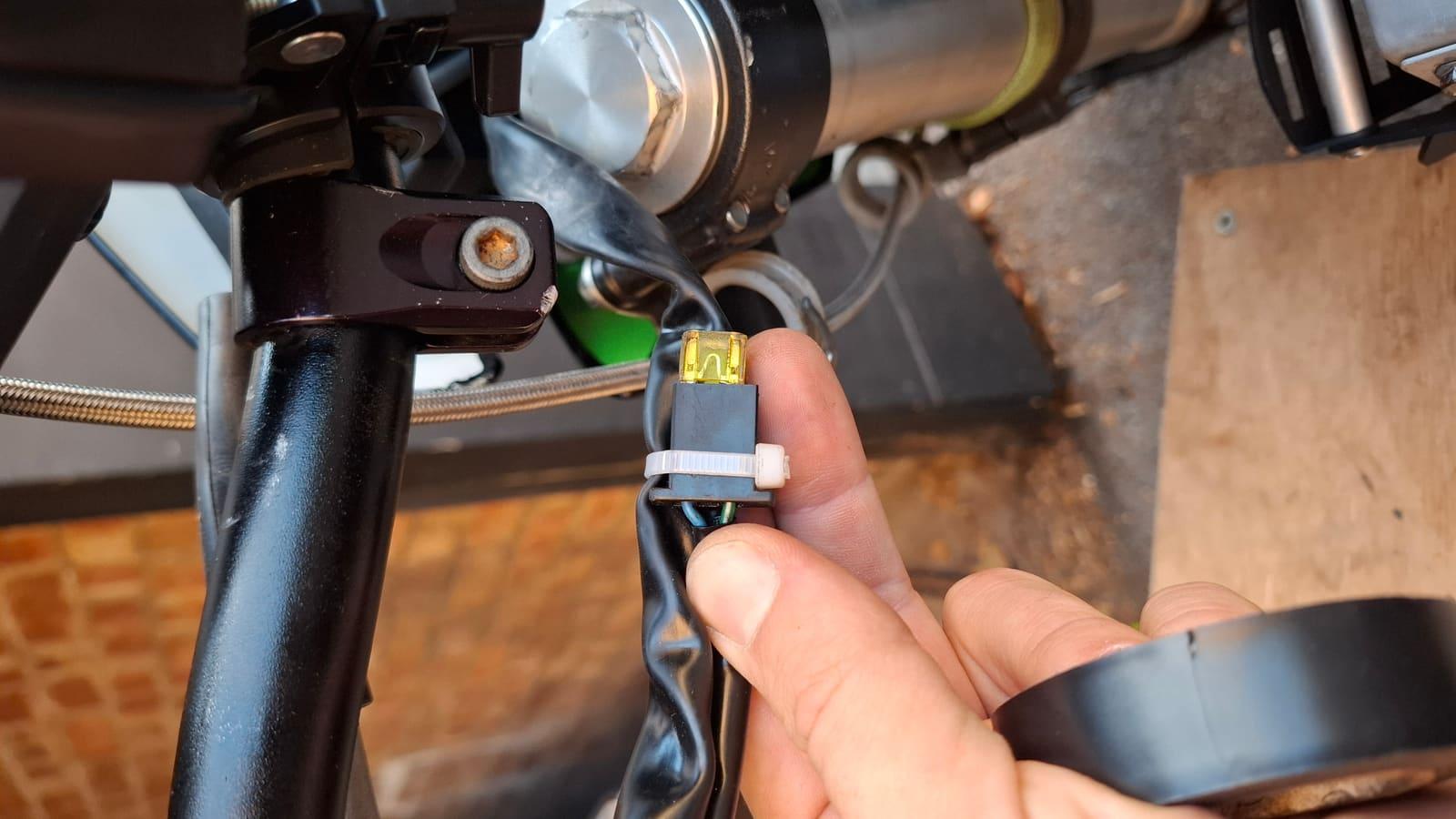
That's the whole mod. The ECU now believes the clutch is pulled at all times and always runs the neutral gear fuel map.
Why:
- Consistent tuning. The bike runs a different fuel map per gear — the ECU calculates a different fuel amount for each RPM/TPS combination per gear. Tuning with a gear in the loop means every correction depends on which gear you were in. With the mod, the bike always uses the neutral map, so the same correction does the same thing everywhere. The TuneFI base map was created on a bike with this mod.
- No deceleration fuel cut. On a gear map the ECU cuts fuel on decel, which makes the bike jerky — and it matters for the tuner too: TuneFI calculates RPM from injector pulses. When the injectors go silent during fuel cut, TuneFI (and any other tuner) loses its RPM reference and only picks it back up when the injectors resume. Fueling while RPM is lost won't be precise. The neutral map doesn't cut fuel, so RPM never drops out.
- The ECU runs open loop. Data logging on a stock KLX300 (thanks Tyler from the community) shows the ECU ignores feedback from the O2 sensor. Average AFR sits near 11.5:1 and never gets leaner than 12.5:1 — rich by design. Rich is safe: it's why the stock bike tolerates mods that add air without leaning out.
Throttle calibration
TuneFI reads voltage straight from the TPS and maps it to 0–100% throttle for the fuel map lookup. The service manual says closed throttle is ~600 mV and wide open ~3600 mV — on my bike, closed throttle reads 460 mV. Every bike is a little different, so calibration is a two-minute job you do once.
Ignition on, engine off — the engine doesn't need to run.
- Sweep the throttle fully closed to fully open a couple of times.
- Watch the TPS millivolt reading on the dash. Note the value at closed throttle and at wide open.
- Go to Devices → TPS → Calibration, enter both values, save.
From now on 0% and 100% throttle land exactly where your bike says they should.
If you later connect the K-line, the ECU also sends its own TPS voltage to TuneFI. Devices → TPS → ECU TPS Calibration sets how TuneFI converts those millivolts to percent. This is purely for logging — the fuel map runs on the device TPS.
Fuel maps
Rather than start from the base map, you can load a shared map for your setup from the fuel maps page — currently my KLX300 map for the PlanetKLX2 intake/snorkel and a high-flow muffler on the stock header.
Dashboard & firmware
The dashboard is built from widgets, and which ones appear depends on what's connected — a Spartan shows up as AFR, the ECU (via K-line) adds RPM, temps, manifold pressure, speed. If a widget you want isn't on screen, add it from the dashboard settings.
TuneFI updates over the air, from the app, over Bluetooth: Devices → TuneFI → Firmware Update.
Skip "Beta" firmware. That channel exists so I can test new features before releasing them to everyone. Stable is what you want.
That's the whole setup. Ride it, log it, and if something looks off — Discord. Second stage, only if you run extra hardware: K-line, aux & wideband.